


Aggregation is an essential tool in data prep which allows us to condense data into clean, high-level summaries, improving usability and allowing for easier interpretation.
What Does Aggregation Aim to Do?
- Aggregation essentially aims to change the granularity of data.
- It takes a data set and changes it into a structured, high-level summary by condensing multiple records (rows) into a single row.
- It is essentially a mathematical operation that takes multiple values and returns a single value. Some examples include:
- Sum
- Average
- Count
- Minimum/Maximum
NOTE: Granularity is the level of detail of the data – it refers to what a singular record (row) in the data set represents. For example, granularity would describe if a row in a data set represents an individual coffee shop or the region of coffee shops.
Data Prep Technique
In Tableau Prep Builder, aggregation is represented by the capital sigma symbol in a flow.
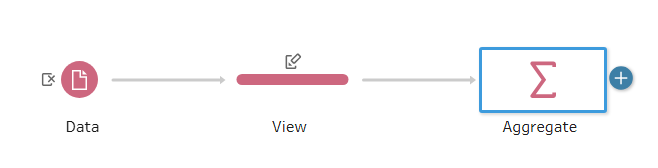
Once you add an aggregation step in Tableau Prep Builder, you then specify which fields you would like to be Grouped or Aggregated Fields.
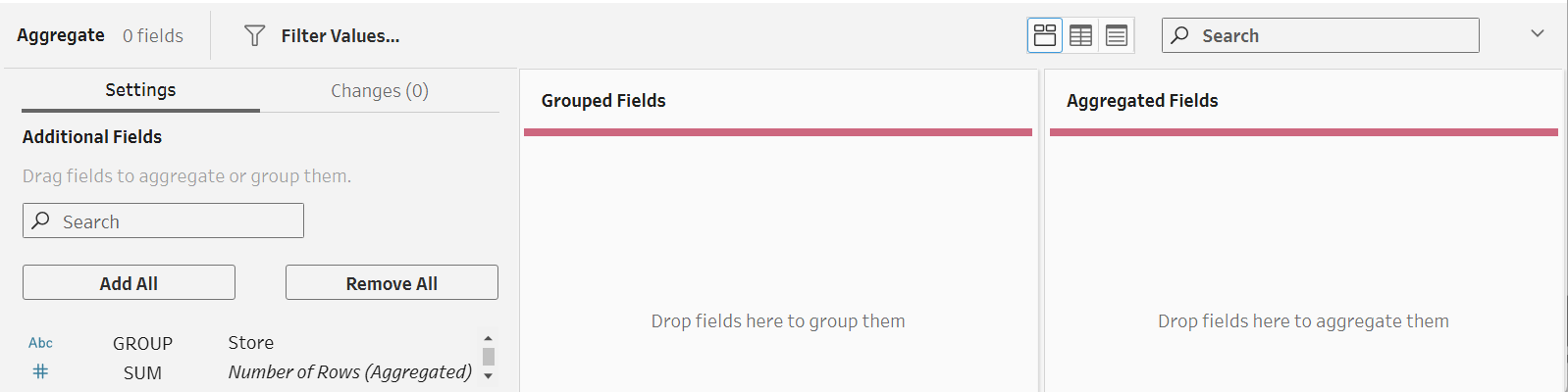
Grouped Fields refer to how the outcome will be structured (i.e. consider what the new granularity will be).
- The field(s) that make up a new row should be placed in the Grouped Fields pane
Aggregated Fields refer to the fields that will be aggregated and presented (i.e. consider what calculations need to be done).
Aggregation calculations for numeric fields:
- Sum (syntax: SUM( ))
- Average (syntax: AVG( ))
- Count/count distinct (syntax: COUNT( )/COUNTD( ))
- Minimum/maximum (syntax: MIN( )/MAX( ))
Aggregation calculations for date or string fields:
- Count/count distinct
- Minimum/maximum
Why Would You Need to Aggregate?
A great question! Some reasons for aggregation include:
- To align with different data sources
- If one data set shows daily sales, and another shows monthly sales, this leads to difficulties with comparisons. In this instance, it is useful to aggregate daily sales to the monthly level.
- To filter out extra unnecessary details
- If you need to provide an overview of sales to an investor, you do not need to know the exact timestamp of each transaction; the store’s daily or weekly total sales would suffice.
Advantages of Aggregating in Tableau Prep Builder over Tableau Desktop
- Using Prep Builder instead of Desktop for aggregations is beneficial if your data set has lots of records. Tableau Desktop may struggle with larger data sets and run very slowly. Therefore, if you aggregate down in Prep Builder first, any sheets or dashboards will load much faster in Desktop.
- It is also beneficial to use Prep Builder when you have lots of extra (unnecessary) details in your data set. Aggregating in Prep Builder allows you to focus on the fields you need to then be used in Desktop.
NOTE: It is important to remember that once you aggregate data and save it, the previous details are gone.
Disadvantages of Aggregating in Tableau Prep Builder over Tableau Desktop
- Aggregate calculations are dependent on the fields in a visualization, so it can be useful to use Tableau Desktop for aggregation. For example, you can create a simple calculation in Desktop for profit and use it to find profit at the regional level, store level, or customer level, etc. This is all done using a single calculation in Desktop. In Prep Builder, you would have to create individual fields for each one.
- Once you aggregate in Prep Builder and save the output, the row-level detail you had before aggregating is gone. You cannot zoom into a specific detail (transaction, customer, etc.) after aggregation. This is why using Tableau Desktop can be desirable – you can keep all the raw data to use as and when you need it.
How Does Aggregation Work?
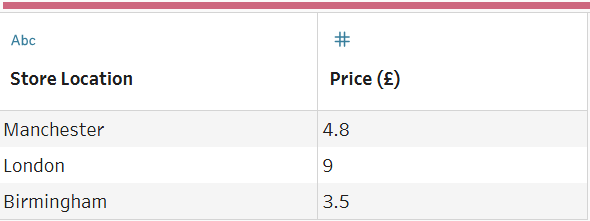
Below we have a table where one row represents a singular transaction in a coffee shop (granularity). In this case, it might be more useful to see how much each coffee shop location is taking daily. To do this, we need to aggregate.
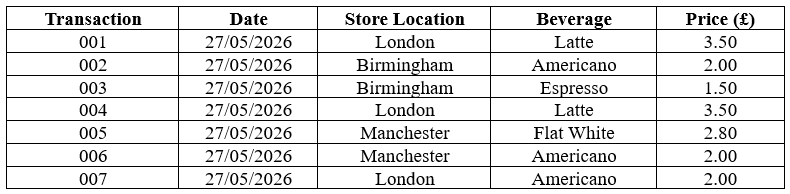
We want one record in our new data after aggregating to represent one store location (London, Birmingham, Manchester), so the 'Store Location' field goes into the Grouped Fields pane and the 'Price (£)' is what we are summing, so goes into the Aggregated Fields pane.
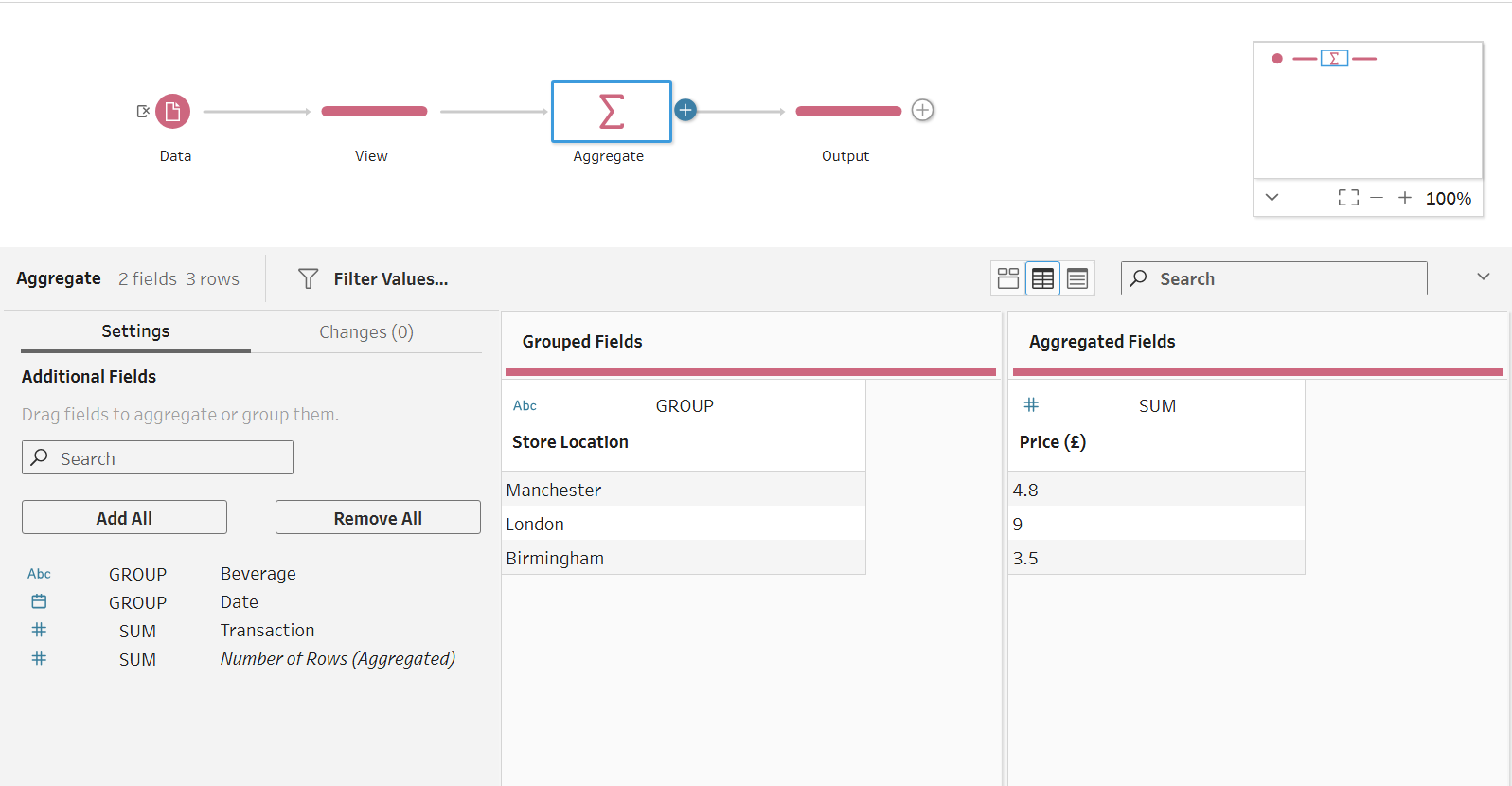
This gives the following output which is much more useful to us:
Aggregation is a concept that comes up frequently when dealing with data prep, so it's useful to familiarize yourself with it and become confident using it whether that's in Tableau Prep Builder or Tableau Desktop!