


Today, our Data Engineering cohort started a four-day project to build a pipeline for Mailchimp data. The project will involve extracting, loading, and transforming data using a variety of tools, including python, AWS, Kestra, and dbt. The end goal is to enrich our data from the Amplitude API to help track user-engagement with The Information Lab's email campaigns.
I took a sprint approach and did a little bit of everything.
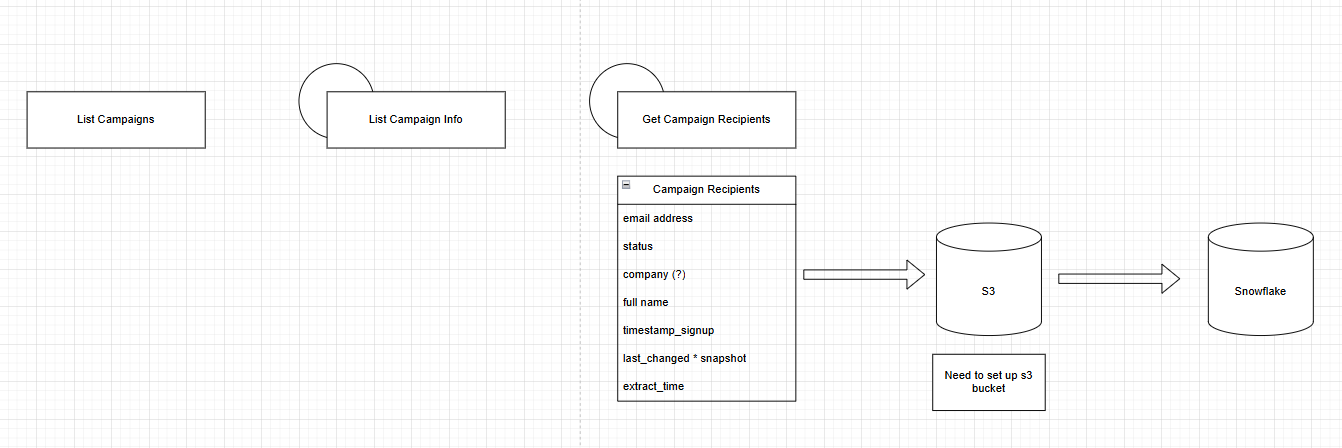
Extraction with Python
My plan was to use the campaign list endpoint to retrieve all campaigns in the past 180 days. Then, I used another endpoint to grab a list of recipients for each campaign. Finally, I retrieved information for all recipients, including email, company, and name.
Because the number of records I can return with one call is capped at 1,000, I had to loop through pagination to get all records. The final number of recipients I fetched was 17,470. Below is my function to handle pagination.
def get_campaign_recipients(list_id, extract_time):
    url = f'https://us2.api.mailchimp.com/3.0/lists/{list_id}/members'
    members = []
    offset = 0
    count = 1000  # max Mailchimp allows

    # Get total number of members
    response = requests.get(
        auth=("anystring", API_KEY),
        params={"count": 1, "offset": 0}
    )
    data = response.json()
    total_items = data.get('total_items', 0)

    print(f'Total members in list {list_id}: {total_items}')

    # Paginate properly
    while True:
        response = requests.get(
            url,
            auth=("anystring", API_KEY),
            params={"count": count, "offset": offset}
        )
        data = response.json()
        page_members = data.get('members', [])

        # If no more members returned, stop
        if not page_members:
            break

        # Process this page
        for d in page_members:
            members.append({
                'email_address': d.get('email_address'),
                'status': d.get('status'),
                'company': d.get('company', ''),
                'full_name': d.get('full_name', ''),
                'timestamp_signup': d.get('timestamp_signup'),
                'last_changed': d.get('last_changed'),
                'extract_time': extract_time
            })

        # Increase offset for next page
        offset += count

        # Stop if we’ve fetched all items
        if len(members) >= total_items:
            break

    df_members = pd.DataFrame(members)

    print(f'Retrieved {len(members)} of {total_items} members from list {list_id}')
    logger.info(f'Retrieved {len(members)} of {total_items} members from list {list_id}')

    return df_members, extract_time
Loading to S3
The next step was to load to S3. I had set up a bucket for Amplitude so I used that for expedience. I created a sub-directory within my Amplitude bucket for Mailchimp data.
Staging to Snowflake
Afterwards, I created a new stage in Snowflake to load in Mailchimp S3 data.
CREATE OR REPLACE STAGE mailchimp_python_stage
  STORAGE_INTEGRATION = cy_amplitude_python_import
  URL = 's3://cyi-amplitude-storage/python-import/mailchimp/'
  FILE_FORMAT = cyi_csv_format;
Now, I had records of all recipients of campaigns in the last 180 days.
Next Steps
- Grab campaign activity to go along with record of campaign recipients
- Finish setting up S3 bucket for Mailchimp data
- Set up dbt repository