


GitHub is widely recognized as a platform for open-source development, enabling developers to collaborate, share knowledge, and build upon one another's code. By encouraging collaboration and transparency, GitHub plays an important role in promoting good software development practices and fostering professional growth among developers.
How does GitHub promote good development practices?
Introducing version control
Version control is the process of tracking and managing changes made to files over time.
Version control offers several important advantages:
- Traceability: Developers can identify what changed, who made the change, and when it happened.
- Collaboration: Multiple developers can work on a project without immediately changing the main codebase.
- Recoverability: Previous versions can be revisited if a modification introduces an error.
- Accountability: Changes can be reviewed and discussed before being integrated into a shared project.
But how can multiple developers work on the same repository without interfering with one another?
What are Git branches?
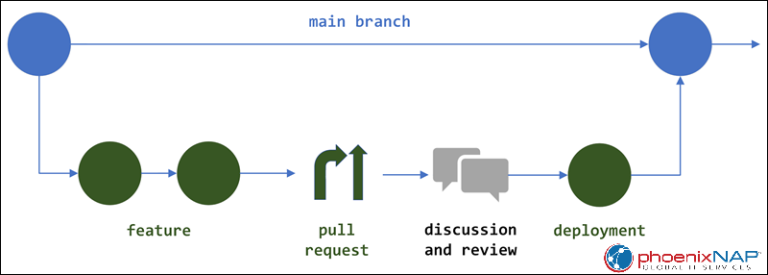
A branch represents an independent line of development within a repository.When a Git repository is created, it typically has a primary branch called main. This branch generally contains the project's main version.
Rather than making every modification directly to main, developers can create separate branches to work on specific features, improvements, or fixes.
For example, imagine a data analytics project containing SQL scripts for cleaning and transforming data.One developer might create a branch to optimize an existing SQL query, while another creates a branch to add new data quality checks.Both developers can work independently without immediately affecting the main version of the project.Once their changes are ready, they can propose integrating them into main through a pull request
What is a pull request?
A pull request (PR) is a proposal to integrate changes from one branch into another.
Rather than immediately modifying the main project, developers can submit their changes for review. In certain setting this requires approval from an admin to ensure the integrity of the main branch remains.
Pull requests provide an opportunity for other contributors to:
- Examine the proposed changes.
- Identify potential errors or improvements.
- Discuss alternative approaches.
- Run automated checks or tests.
- Approve changes before they are merged, where review is required.
This is particularly valuable in collaborative environments where one developer's changes may affect another developer's work. A pull request creates transparency around what is being changed and why. Importantly, creating a pull request does not automatically integrate the changes. The changes still need to be merged.
What does merging mean?
Merging is the process of integrating changes from one branch into another.For example, suppose a developer creates a branch named "improve-sql-query" to optimize a data transformation.
Once the developer has completed the changes and the pull request has been reviewed, the branch can be merged into main.The main branch will then incorporate the approved changes.
However, merging isn't always straightforward.
This reinforces why version control is so useful: it provides a structured process for coordinating changes rather than allowing developers to overwrite one another's work.
Conclusion
GitHub's value extends beyond making code publicly accessible. By combining Git's version control capabilities with tools for collaboration, code review, and project management, it supports a more structured approach to software development.
Branches allow developers to work independently. Pull requests introduce opportunities for review and discussion. Merging enables approved changes to become part of a shared codebase.
Together, these practices help developers build projects that are easier to maintain, improve, and collaborate on.
For a cheat sheet on useful Git command prompts: https://git-scm.com/cheat-sheet