


During our 12th week of training at The Data School, we had the opportunity to learn some SQL. Having been briefly introduced to it during my university days many moons ago, I was keen to build on that foundation and develop a more practical understanding. I thought I’d share some of the key things we learned in a series of blog posts, starting off with everything you’d need to write your first basic query.
SQL is used to interact with databases, with one of its core functions being the ability to execute queries to retrieve data – this is done by using a set of commands.
Query Structure:
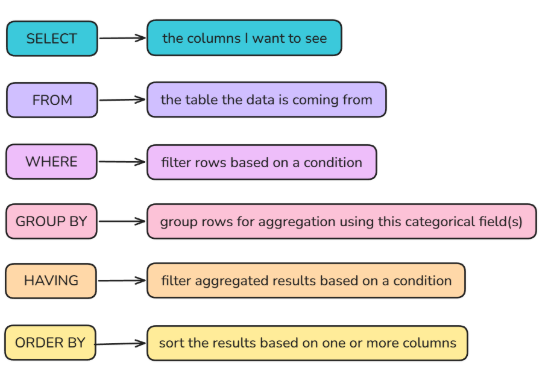
SELECT and FROM are commands that will be used in 99% of queries, but as for the rest, whether or not they need to be included depends on the data you want to return. However, when they are used, they need to follow the above order for SQL to execute the query correctly.
Now that we’ve established the basic commands in SQL, let’s look at some examples to see how they are used, along with additional techniques to control the output.
Selecting Data:
1.
SELECT *
FROM orders
returns every row and every column from the orders table.
2.
SELECT *
FROM orders
LIMIT 100
does the same as the previous query, but LIMIT is also used to limit the number of rows returned to at most 100.
3.
SELECT order_id AS “Order ID”
, customer_id AS “Customer ID”
, sales
, quantity
FROM orders
Instead of every column, we choose four specified columns to return, using an alias in speech marks after AS to rename the first two columns for better readability.
4.
SELECT DISTINCT ship_mode
, product_id
FROM orders
Using SELECT DISTINCT (instead of SELECT) returns rows with a distinct combination of the columns selected – in this case unique combinations of ship_mode and product_id. This can also be seen as setting the granularity.
Joining Tables:
5.
SELECT *
FROM orders o
INNER JOIN customers c
ON o.customer_id = c.customer_id
Instead of querying a single table, we are now querying two tables that are joined together.
To execute a join in SQL, we need to specify two things:
- Join type – what type of join is it?
- Join clause – what are we joining on?
In this example, we want an inner join on the customer_id field, so we only return rows where there is a matching customer_id in both the orders and customers tables. When joining tables, it’s best practise to alias them (e.g. o and c) so that it’s quicker to write when referencing columns.
6.
SELECT o.order_id
, c.customer_name
FROM orders o
INNER JOIN customers c
ON o.customer_id = c.customer_id
returns the two specified columns from the join - but make sure you reference the table they come from in case the same column name exists in both tables.
Filtering Data with WHERE:
7.
SELECT *
FROM orders
WHERE sales > 1000
filters rows so that only those with a sales value greater than 1000 are returned. Similarly, other comparison operators can also be used.
8.
SELECT *
FROM orders
WHERE region = ‘West’
filters rows so that only those in the West region are returned.
9.
SELECT *
FROM orders
WHERE state LIKE ‘%Carolina’
filters rows so that only those with states ending in Carolina are returned. % is used here as a placeholder for multiple characters, but to represent only a single character _ would be used.
10.
SELECT *
FROM orders
WHERE city in ('Chicago', 'Detroit', 'Dallas')
filters rows so that only those belonging to the specified cities are returned.
Aggregation and Grouping:
11.
SELECT AVG(sales) AS “Average Sales”
FROM orders
returns the average sales value. This is only one example of an aggregation function, there are many more (SUM(), COUNT(), MAX(), ...).
12.
SELECT ship_mode AS “Ship Mode”
, AVG(sales) AS “Average Sales”
FROM orders
GROUP BY "Ship Mode"
returns the average sales value for each ship mode.
13.
SELECT ship_mode AS “Ship Mode”
, AVG(sales) AS “Average Sales”
FROM orders
GROUP BY “Ship Mode”
HAVING “Average Sales” > 230
only returns the ship mode and corresponding average sales value if the average sales value greater than 230.
Sorting Results:
14.
SELECT *
FROM orders
ORDER BY sales DESC
returns all the rows from the orders table, ordered in descending order based on their sales value.
Of course there are many more commands in SQL, but the above examples are a good starting point, and can be combined in various ways to create more complex queries.