


Have you ever been tired of faffing around with your emails? Perhaps you get a weekly attachment that you need to manually download? Maybe you need to send a daily email to a fixed email list? And perhaps, on one of those occasions, you thought to yourself, "Gee willikers, I wish I could just press a button to make this happen automatically!"
There are plenty of reasons someone might want to automate a part of their email flow. Thankfully, many major email providers have well-documented APIs allowing people to do just that. And this includes (as you may have surmised from the title of this blog post) Gmail.
This blog series will take you from start to finish on using the Gmail API through a worked example: setting up a client, navigating Git and Python, and finally building out your own custom code. Hopefully, this can also serve as a solid foundation for using other APIs in future.
This first introductory part will be focused more on the context around APIs in general. So, without further ado...
What is an API actually doing?
Most simply put, an API (short for Application Programming Interface) is a way of making different pieces of software talk to each other using mutually agreed language. To use an analogy, imagine a restaurant. You, the customer, order food via a waiter. The waiter communicates your order to the kitchen, the kitchen makes your meal, and the waiter brings the meal to you. Your initial food order is the request, or API call; the food you receive from the waiter is the equivalent of an API response.
They're pretty much everywhere. Think about an aggregator website for booking hotels. The aggregator website doesn't have access to the full database of every hotel within its system. Instead, it's sending out an API call to outside servers, asking which rooms are available and when. The outside server then sends back a response with the requested information, which can then be displayed on the website. When a booking is made, the aggregator will tell the server to update with that information - and voila, the hotel now has your booking on file!*
*(Disclaimer: this is a general example, not necessarily a treatise on information flow within all aggregator websites, please don't sue me for misinformation.)
Why use an API?
This turns out to be a pretty efficient way to letting the systems talk to each other. Imagine if, in our hypothetical restaurant, there are suddenly no waiters. Customers either wouldn't be able to order their food at all or they'd end up wading into the kitchen to order directly, which I imagine the chefs wouldn't be too pleased about. Chaos would ensue. So all in all, having the waiter present makes things much more streamlined.
Let's return to a more technical example. Our hotels aggregator website can be specific about the information it needs and get it quickly by asking the hotel's database directly. And the hotel just have to throw open their metaphorical doors to the aggregator site, so to speak; if designed well, the aggregator has only constrained access to their database, so sensitive data within the database stays safe and secure. Win win.
API Specifications
There is no universally agreed upon "API language" that works for everyone. Broadly speaking, APIs are specific to one use case, often purpose built to allow structured access to their data. If the creator of the API wants to make that process easier (which, unfortunately, is not always the case) they will provide a specification, some kind of document which tells you how to construct your API and what the response might look like. JSON is a common format for storing response data, but the response can come in different forms.
A common form of API is web APIs, where the software to software communication happens via the internet. In these cases, most of the information on the request is within a url string. Let's look at a free-to-use example: the Star Wars API, which does exactly what you might expect from the name. The base url of the site is "https://swapi.info/". But if we navigate to People > C3-PO, the url is "https://swapi.info/api/people/2". The url tells the Star Wars API to get the 2nd listed person, which in this case is C3-PO (no prizes for guessing who's first). And our response to that url is a bunch of information about C3-PO in JSON format:
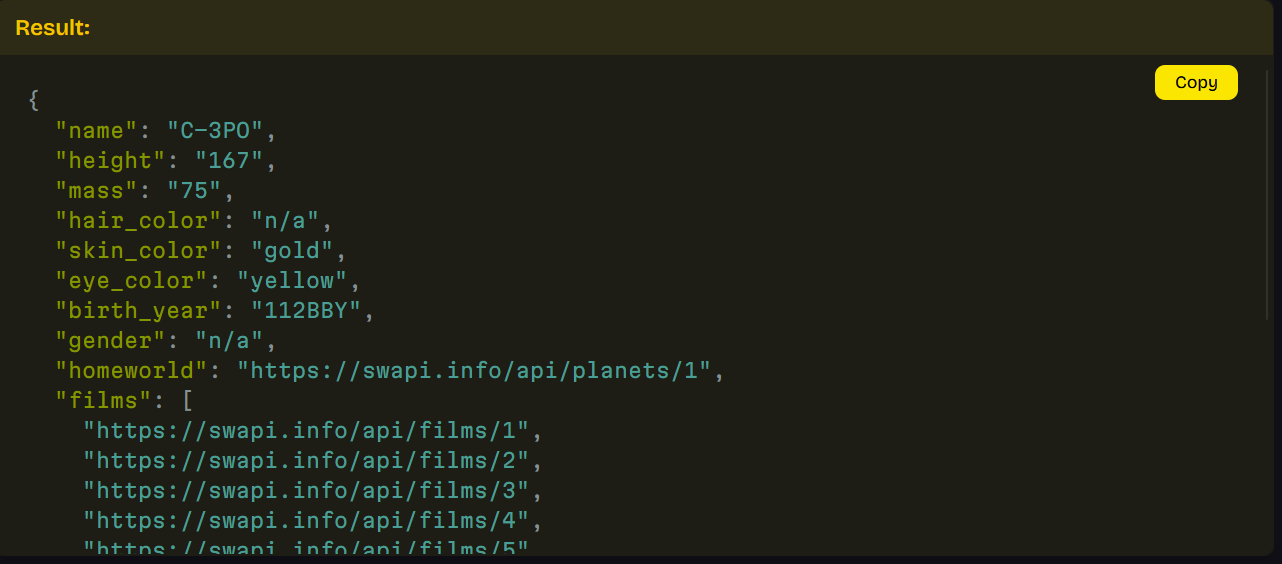
This is a very simple API with a friendly UI to help navigate it, but of course many APIs will be much more complex to wrap one's head around. That's why the specification is so important.
So what now?
This project is on the Gmail API, which thankfully has a lot of documentation around its use. As with using any web API, the API specification will be our first stop. This should tell us:
- What url(s) we might need for our call?
- How do we configure permissions so that our software (Python) can talk to Google?
- What kind of data are we going to be getting as our response?
All of that to come in Part 2 – Navigating the Specification!