


Regular Expressions (RegEx) are a sequence of characters used to define a pattern within a text. They are a powerful tool for extracting specific parts of a messy string of data, something more crude text cleaning functions fail at. In this blog we introduce a basic example of their syntax and how they can be used.
Syntax
The syntax of RegEx can be difficult to learn but once mastered is an invaluable language to know. What makes knowing it even better is that it is a universal language meaning it can be used in Tableau, SQL, Alteryx, Python and more.
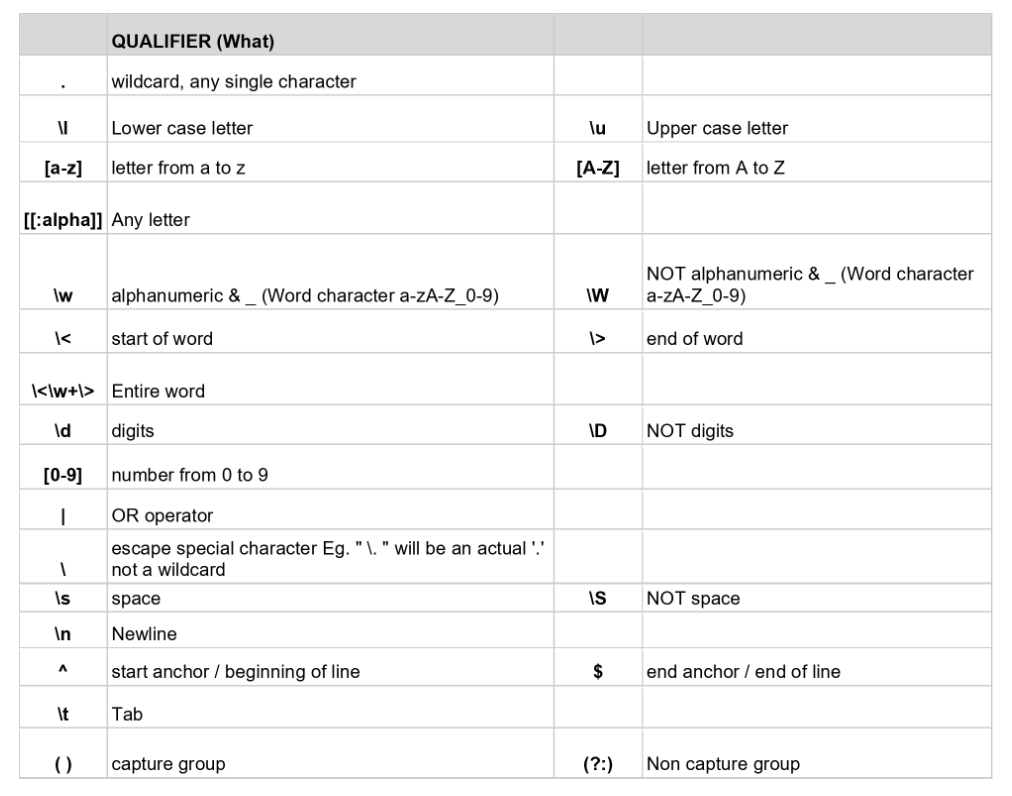
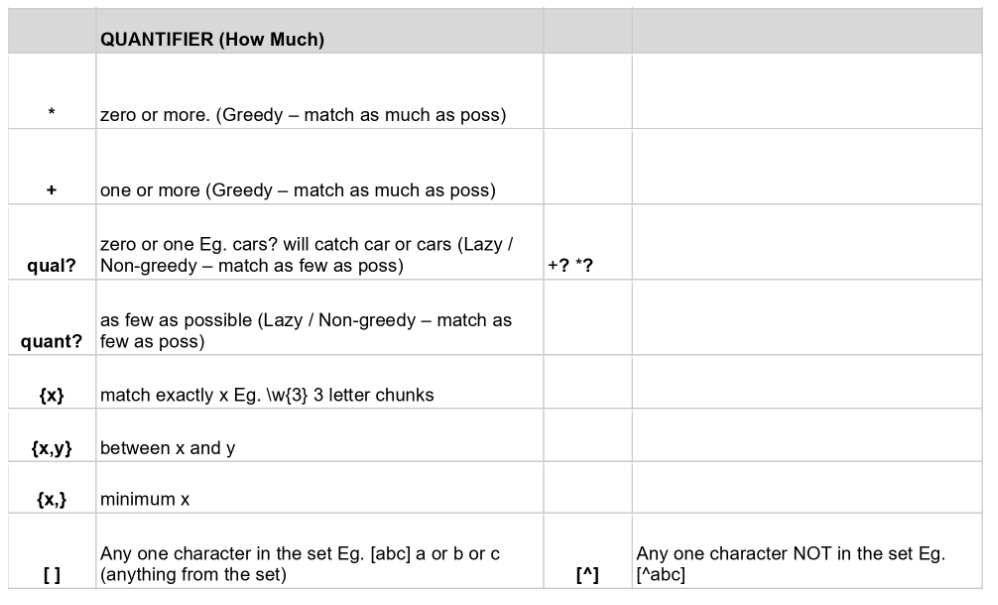
The functions can broadly be separated into qualifiers (figure 1) and quantifiers (figure 2). Qualifiers are used to define what characters we want to extract from a text whilst quantifiers are used to define how much we want to be picked up.
Postcode Example
The best way to learn the syntax is by applying it to examples. In this blog we will use the simple example of extracting UK postcodes from the following lines of addresses:
10 Downing Street, Westminster, London SW1A 2AA
221B Baker Street, Marylebone, London NW1 6XE
45 Princes Street, Edinburgh EH2 2DG
12 Bold Street, Liverpool L1 4DS
78 Queen Street, Cardiff CF10 2GR
33 Donegall Place, Belfast BT1 5GB
5 Broad Street, Birmingham B1 2HF
27 King Street, Manchester M2 6AJ
14 St Nicholas Street, Bristol BS1 1UE
9 Grey Street, Newcastle upon Tyne NE1 6EE
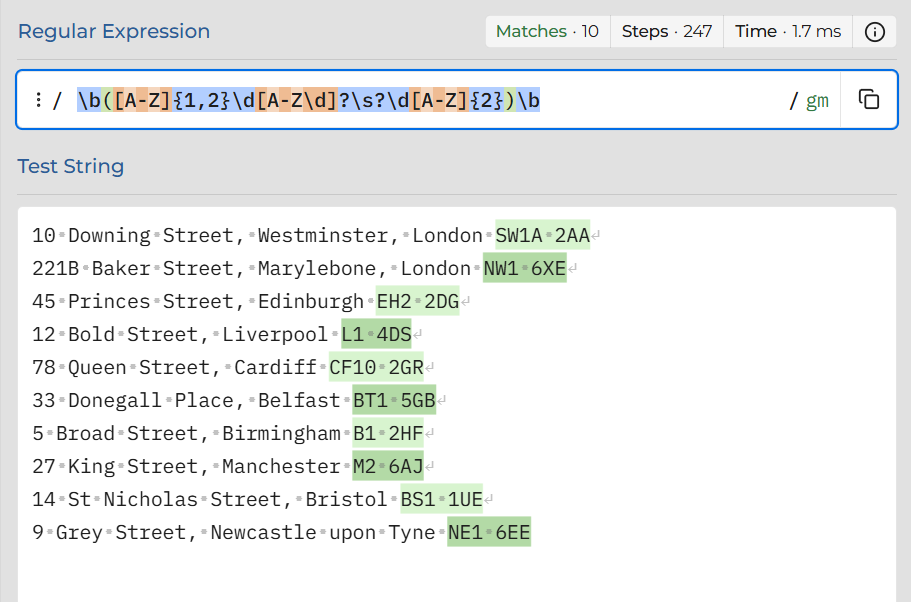
We only want the postcodes. In the UK postcodes follow a structure (outward code followed by an inward code) so this can be taken advantage of when trying to extract them. A useful tool for testing RegEx is RegEx101.com which is shown in figure 3.
Why does this particular Regular Expression work?
1) The \b...\b ensures only standalone postcodes are selected rather than those within larger blocks of text, i.e. XXSW1A2AAYY. The \b is used to define word boundaries.
2) The [A-Z]{1,2}\d[A-Z\d]? is for finding the first half (outward code) of the postcode. It basically looks for one or two capital letters, followed by a number, followed by an optional number or capital letter. For example: BS1 or CF10
3) The \s? looks for the optional space between the outward and inward codes
4) The \d[A-Z]{2} looks for the second half (inward code) of the postcode. It looks for a digit followed by two capital letters
Combining that altogether into one expression allows a full UK postcode to be found within a string. You can see from figure 3 that only the postcodes have been highlighted indicating that the expression has located them. When writing RegEx its important to be specific enough to extract only the parts of a text you want, but not so specific that certain parts are missed out. It is also highly likely there are multiple ways of writing an expression to achieve the same outcome.
So there you have it, a simple example of the power of RegEx in extracting parts of complicated strings.