


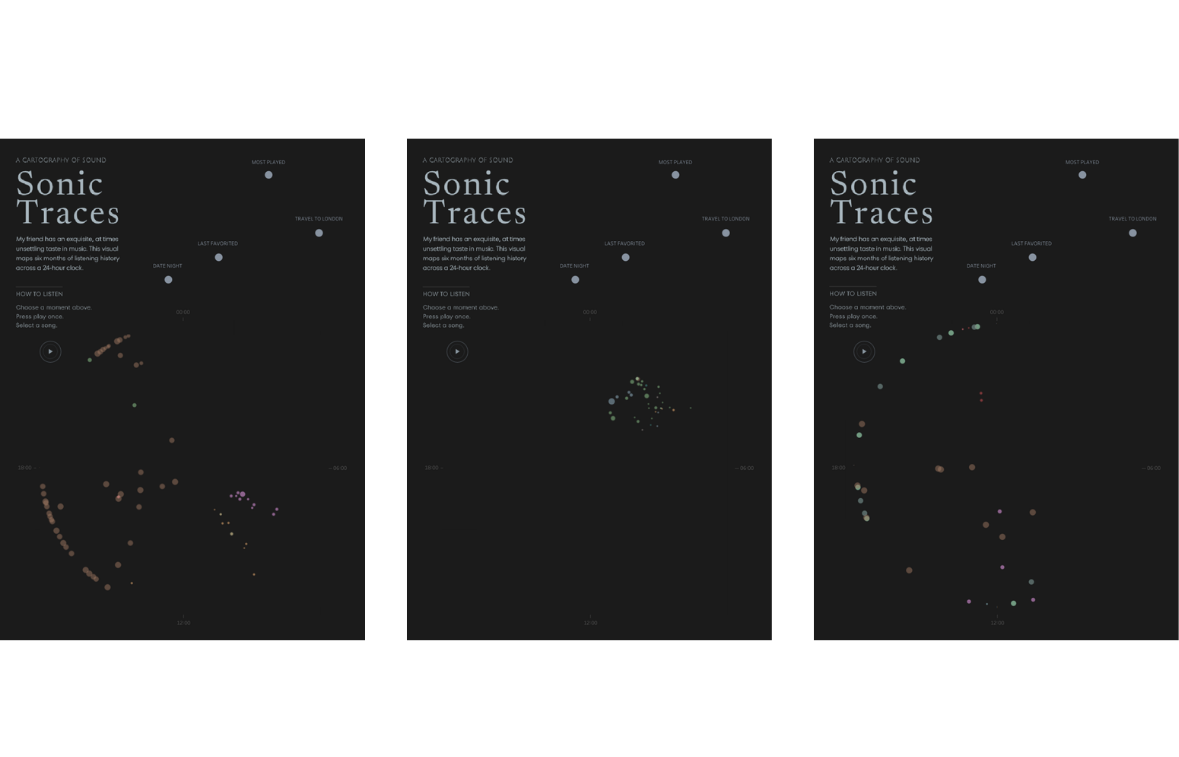
One of the best things about personal projects is that they can keep evolving. After originally creating Sonic Traces during Dashboard Week, I revisited the project to add a feature I had envisioned from the start: the ability to hear the music behind the selected moments.
Why I built my own player
My first thought was to use the existing Spotify or Apple Music embeds. While they work well for playing tracks, they also introduce large player interfaces with album artwork, playback controls and additional information. For this project, that would have disrupted the minimalist editorial layout. I wanted the visualization and the music (not the player) to remain the centre of attention.
Instead, I built a minimal custom player: a small circular play button that smoothly blends into the dashboard.
From Extension to Web Page
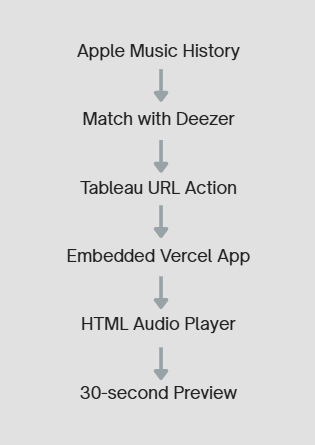
My first implementation was a custom Tableau Extension built with HTML, CSS and JavaScript, hosted on Vercel. It listened for mark selections and played a 30-second preview whenever a song was selected.
Because Apple Music exports do not include preview URLs, I matched my friend's listening history against the Deezer catalogue and retrieved the corresponding preview clips.
The extension worked perfectly in Tableau Desktop, but Tableau Public only supports trusted extensions.
So in a second try, I embedded the same application as a Web Page Object. Tableau now passes the selected Deezer Track ID to the embedded app through a URL Action. The app requests the preview from Deezer and updates a simple HTML audio player.
The workflow looks like this:
One small caveat: because browsers block autoplay, visitors need to press play once. After that, they can select songs from different moments and hear their previews, making each moment feel far more authentic than a visual representation alone ever could.
Final Thoughts
This project started as a one-day dashboard challenge and became an opportunity to push Tableau beyond its traditional use case. It reminded me that combining Tableau with lightweight web technologies and a bit of creativity can unlock experiences that simply aren't possible with built-in features alone.
If this inspires you to experiment with audio in Tableau, you'll find the complete source code and setup instructions on GitHub. Feel free to use it as a starting point for your own projects.
🔗 GitHub: Sonic Traces Player
And if you'd like to hear the final result, explore my friend's musical moments in the finished visualization:
🔗 Tableau Public: Sonic Traces: Listen & Explore ♫