


What is Snowflake CoCo? An AI coding agent within Snowflake that enables users to interact with data through a conversational interface.
How does it operate? CoCo is able to orchestrate and use multiple AI models and can route your tasks to different AI models depending on what’s required. For example, in the session we had the ability to select whether prompts were being sent to ChatGPT or Claude. When the Auto setting is enabled, CoCo will decide which underlying model is best suited to a particular task.
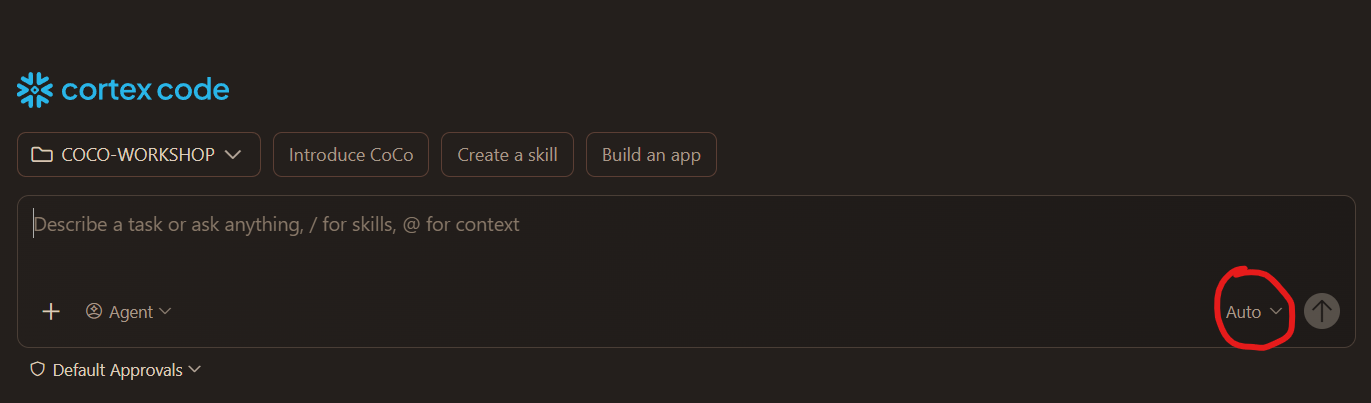
With CoCo everything stays inside the Snowflake environment which is a strong selling point in terms of governance. It can only see and act on what you allow it to access.
Token this…token that
Every message CoCo generates (and every message you send that it processes) counts as tokens billed. An example below is the pricing for connecting to an OpenAI API (GPT-5.5):
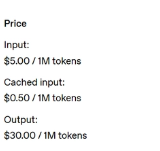
The image shows how tokens are used to measure and bill for the amount of data processed by this particular ChatGPT model. As a rough rule of thumb, one token is approximately 3-4 characters, although the exact number varies depending on the model, meaning a prompt consisting of a couple sentences could come in at around 50-100 tokens. The input token amount is the cost of that GPT model reading your prompt and the output token amount is the cost for you to see the output (whether that is code/text etc). Outputs such as files, reports or extensive code will generally consume significantly more tokens than responses containing only a few sentences.
When using Snowflake CoCo, it costs Snowflake credits based on how many tokens you use. Currently, it’s a valuable skill to understand and be smart about how many tokens you use. As a lot of AI is very conversational, it’s easy to prompt away and be unaware of costs. AI finance and being able to calculate the monetary value add of AI interactions is a very interesting topic!
Using CoCo: Linking with GitHub
At the beginning of the workshop, we created a local project folder called coco-workshop and linked it to GitHub. We then connected CoCo to this folder, allowing it to work directly within the project and save any generated files to the repository.
Using CoCo: Setting up an agent rules
Rules and instruction files are used to guide AI behaviour. They are context and guidelines that are automatically applied at the start of each conversation. This agents.md file was created with the following instruction:
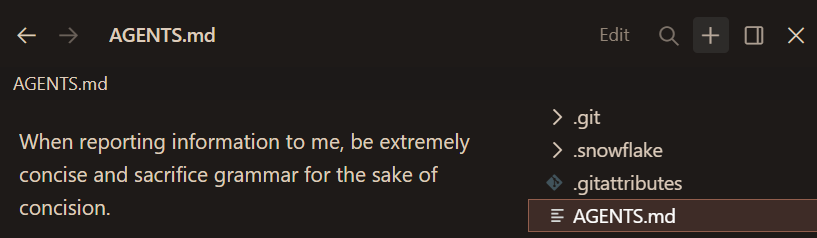
In theory, more concise outputs should generally reduce token usage and therefore cost (or just get it to speak like a caveman).
Using CoCo: Creating a skill
A skill is context that teaches the AI agent how to execute a specific, repeatable task. If CoCo was generating lots of complex code for you regularly and you wanted to check this code in a particular way, you could clarify/create a skill which will explain you the code in a particular way. For example, you could create a skill called /explain-code
‘Please create ascii diagrams where possible and explain the code line by line as if I was a novice’
Now everytime you would type /explain-code , CoCo will apply that skill.
Skills were an area which particularly stood out to me in terms of how AI could be deployed across businesses. By creating skills, this allows users to standardise how an AI performs recurring tasks, ensuring outputs are consistent and aligned with business requirements. This not only improves efficiency but also reduces the risk of inconsistent outputs across users.
Using CoCo: Plan Mode
Plan mode is a really useful feature as CoCo will stay in ‘read-only’ mode. The agent will present an organized step-by-step implementation plan and explain its choices. As a user, you can then review, modify or approve the plan before execution.. This makes plan mode particularly valuable for high-risk operations, as it provides greater transparency and opportunity to identify potential issues before CoCo executes a task.

Final thoughts
Ultimately, learning some of CoCo’s basic capabilities (particularly through Plan Mode, Skills and instructions/rules) helped improve my understanding of how CoCo can be tailored for businesses. These features enable businesses to create specialised agents that operate consistently which, in turn, enables more reliable outputs and control over AI-driven workflows.