


As an engineer working toward a data engineering role, understanding how to customize and direct AI tools like Claude is as relevant as knowing your data stack. That's what drew me to Anthropic's courses — I wanted to go beyond using Claude as a chat tool and understand how to properly configure it for technical workflows. This blog series will cover some of the concepts I learned along the way, starting with agent skills.
First, some background
Anthropic is a company focused on AI safety & research; its main purpose is to build reliable systems and share research on what it learns along the way. One of their well-known AI products is Claude. For those of you not familiar with Claude yet, it’s a highly capable, customizable AI assistant - useful out of the box for everyday tasks, and flexible enough to be embedded into complex personal or business workflows.
When you think about situations where you’ve had to give (or receive) instructions to complete a task, having accurate and clear information made the task easier to understand and possibly more efficient to complete. With AI agents, it works the same way – even though they can complete tasks with only basic information, a more detailed description makes them more efficient.
With Claude, these sets of detailed instructions are called skills. Skills are Markdown files containing instructions that Claude can use when processing requests in your development project. Instead of repeating the same specifications for certain prompts, you create a skill and give it a description that clarifies two things: what it does, and when Claude should use it.
It’s almost like teaching a service dog what it needs to do in certain scenarios. These scenarios will occur repeatedly (e.g., low blood sugar in diabetic patients), and instead of needing to tell the dog what the patient needs every time, it’s trained to recognize the signs and respond accordingly.
Then, some technical details
Claude has several ways to receive instructions for different levels of a project. The CLAUDE.md file is loaded with every conversation – it’s the user manual for how Claude will handle the project (it can be modified to your requirements, but comes in a standard format). The SKILL.md file is specific to your project’s use case and entirely custom-created. Slash commands are explicitly typed during conversations.
Skills have their own hierarchy. Enterprise-level skills are the highest priority and are usually for company-wide standards. Personal-level skills enable employees to customize their projects without affecting others. Project-level skills are customized for specific use cases that are not used on an enterprise level. Plugins are packaged skills imported from public repositories.
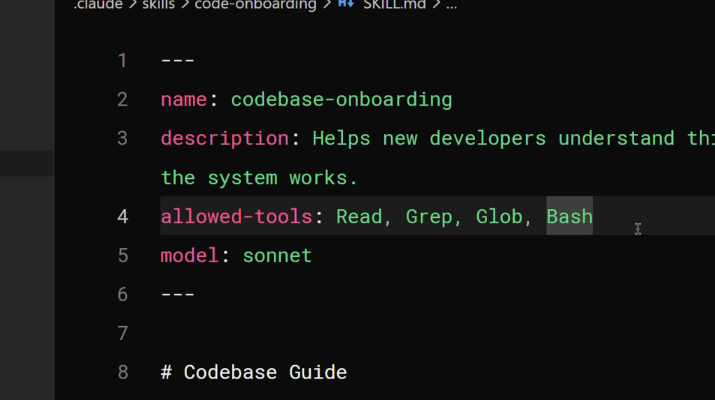
The layout of a SKILL.md file is straightforward; it requires a name and a description, and you can optionally add specific tools it can use with this skill or specify a Claude model it should use (more about Claude models here), before you write the instructions that Claude will follow when this skill is activated.
Sometimes, skills require additional information, such as example scripts, references to additional documentation, or assets like images and templates. Instead of adding all of this to the skill and making it complex and expensive to process, these additional files can be saved in their own directory. The skills file only includes instructions on when and how to load these additional resources. This is called progressive disclosure. Storing additional resources in their own locations also makes it easier to reuse them in other skills.
So, when Claude Code starts, it only loads the names and descriptions of the skills in your project. After a request is sent, Claude compares the message to the descriptions in the available skills, and if a match is found, it prompts the user to confirm if it can load the skills into its context to complete the task. If the task requires additional resources, Claude will load them based on the skill's location and instructions.
The great thing about skills is that they can be shared across teams and organizations. This means the skill you are looking for might already exist, or the skills you’re creating could be solutions that other companies could also benefit from.
Lastly, the summary
Since skills are best suited to specialized knowledge that applies to a specific use case or company, you can build them to address specific tasks, such as code review standards, commit message formats, brand guidelines, documentation templates, and debugging checklists for specific frameworks, making repeated requests easier to handle.
Quite impressive to think that we can teach an AI to better understand our needs. If you want to learn more about the behind-the-scenes of AI assistants, check out my next blog.