


I’ve known about RegEx (short for Regular Expression) from a little before I joined the Data School, when I was doing some light reading on uses of Alteryx and saw the term come up. Since then, RegEx has seemed to appear around every corner in the ‘ideal’ solutions for various Alteryx challenges, mocking my lack of understanding of its arcane script. Well no longer! This week we had a day of classes specifically focused on RegEx. Hopefully by the end of writing this blog, the knowledge will be consolidated, and I’ll be able to strut off into the Alteryx challenge archives to mock newbies with my skills. With any luck, you’ll be able to do the same.
RegEx is fundamentally a text-searching tool which is integrated into a number of other software and programming languages. For our purposes, I will focus on the version present within Alteryx specifically as present in the RegEx tool in the Parse pallet.
RegEx takes queries from the user in the form of the patterns of text, as opposed to necessarily requiring direct specification of the text one wants to search for. Consider the following query:
\s\w{3}\s
This corresponds to a whitespace (\s) followed by any alphanumeric character (\w) exactly three times ({3}) followed by another white space. If we were to use the Match function within the RegEx tool in Alteryx, this tool would return true only for strings which matched that format exactly. So the strings ‘ Dog ‘ and ‘ c0W ‘ would both be True, but the string ‘ Doggy ‘, or even ‘Dog’ would be False. That final string would be false because while it matches the central section of the RegEx input, it is lacking the spaces on either side of the alphanumeric characters.
A full cheat sheet of RegEx quantifiers and qualifiers is included below. The qualifiers tell the software what to search for, while the quantifiers tell the software how many of those qualifiers to search for. Key among the qualifiers is the period, which indicates a character of any kind. Some quantifiers, such as + and *, provide indefinite ranges, rather than specifics. In these cases, RegEx will by default include as many characters as possible.
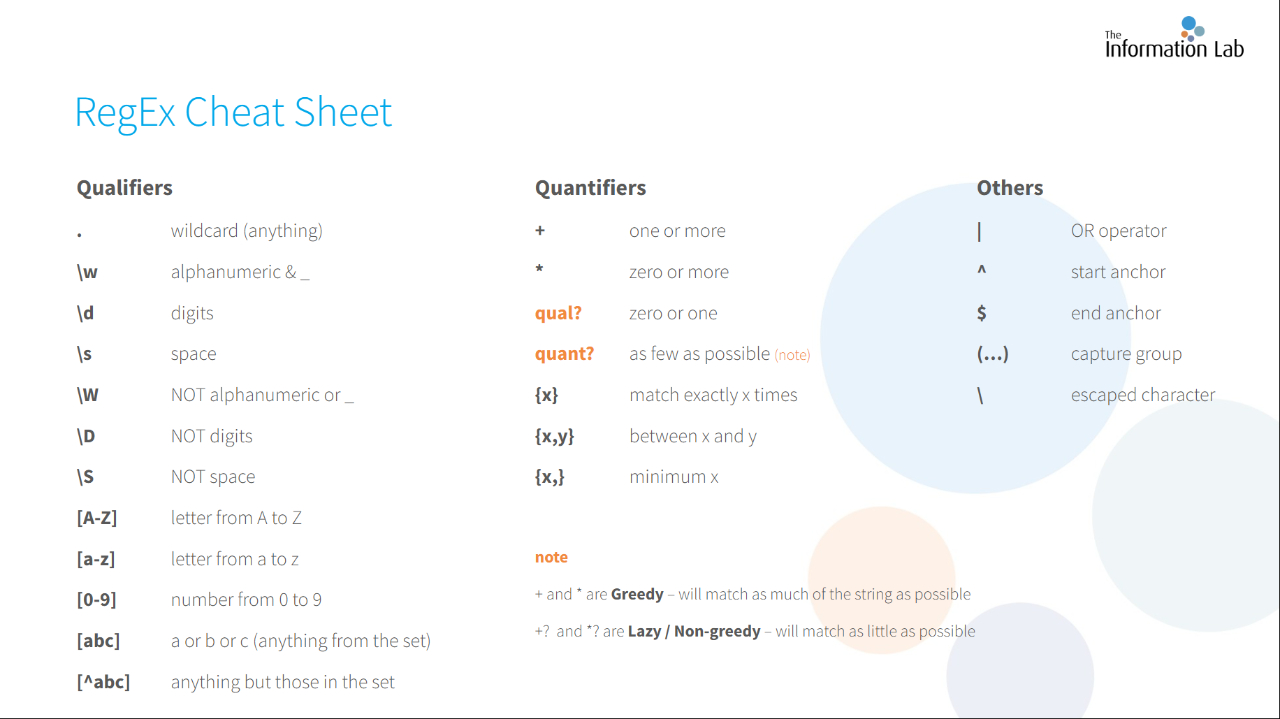
To illustrate this last idea, suppose that we wanted to pick out just the word ‘Many’ from the following two sentences:
There Are Many People In The World, But Mary Is My Favorite.
Given That There Are So Many Options, I May Be A Fool.
And that to try and do so we used the Parse function with the input
(M.*y)\s
The parentheses indicate the section we want ‘extracted’, and the whitespace indicator essentially says that ‘there will be a space after the final character in the desired string’.
So capital ‘M’, any number of characters of any type and a lowercase ‘y’. All of this will be followed by a white space, although we do not want this white space included in the output. Looks good right? Well I wouldn’t have highlighted it if it were. This input, unfortunately, will grab all of the characters from the first ‘M’ to the final ‘y’ which precedes a whitespace. So our output would not be “Many” twice but rather, “Many People In The World But Mary Is My” from the first string, and “Many Options, I May” from the second. If we wanted to get our desired output, we could instead quantify the statement with the ‘?’ symbol, which tells RegEx to return as short a string as possible, while still abiding by all other rules.
(M.*y)\s?
Take a second to reread this section if you do not entirely understand, since this is one of the most common difficulties that people run into when trying to use RegEx.
With a basic understanding of the syntax, what does the Alteryx tool specifically allow us to do? The Alteryx RegEx tool has four ‘Output methods’: Replace, Tokenize, Parse and Match.
Replace will identify a sub-string according to your RegEx input, and replace any unique instances of that sub-string with your choice of replacement. For example I could use my ‘Many’ example from before, and replace those instances with ‘Few’.
Tokenize works similarly to the Alteryx ‘Text to Columns’ tool, and will copy any instances of the indicated sub-string into their own new columns.
Parse works similarly to Tokenize, in that they both create new columns. But whereas the Tokenize method will seek out any instances of the pattern and make them into a new column, the Parse method will create a new column for each set of parentheses included in the RegEx input expression. This allows for the user to specify different patterns for each of their desired columns, but also means that if they want multiple columns of the same pattern they must manually enter each one.
Finally, Match returns a True/False condition, depending on whether or not the entire string matches the RegEx pattern provided. This is the situation with the ‘ Dog ‘ examples from earlier.
Hopefully this provides a useful brief introduction into the Alteryx RegEx tool, and the RegEx language more generally. RegEx is extraordinarily powerful when used correctly, and can do the work of several tools in just a single line, however it requires a strong understanding of its internal functioning and can often be overwhelming. I recommend practicing some simple exercises such as:
- How would you pick out just the section before the @ in your email address?
- How would you split your phone number so that the area code is in a distinct column?
- If a person has several middle names, how would you select just their first and last name, and store those in two distinct columns?
Good luck!