


During my first week at the Data School, my quick annoyance at the way that I was able to use the calendar to see kicked me off on a journey I did not expect. I described the first stage of my journey through my first blog post.
It's been four weeks now since I started at the Data School, nearly a quarter of my way through the training. Since then, I will say that I have appreciated having put in the effort to create the calendar separator. Every morning now when I walk into the office, it only takes me a second to figure out where I am at a quick glance.
But it wasn't perfect and I've continued to slowly work on it in the background. And on the Wednesday of my fourth week, I deployed the second version of my calendar separator. With this version, some of the features that it was initially missing are now present.
Scheduled Running
The first issue was a lot easier to solve than I thought. With my previous experience, I knew that Zapier was a tool that I could use for automation. But after some tinkering and researched, I realized that if I wanted to use it, I would have to use a Google Sheet as a proxy for the calendar script. So that wasn't an optimal choice.
Then the answer hit me like a brick in the face. Google App Script itself has a scheduling tool to run a deployed script. So after getting some recommendations on update times from DS55, it took only a few clicks to implement it to run at 8pm each morning.
Replacing Events
In the name of efficiency, it would be smart to have the script only replace events if the event has changed from the previous version on the calendar. This would reduce the amount of changes needed to be made to the calendar, especially if unique calendar events not on the Data School calendar needed to stick around.
With some of the improvements that I have made, I am now able to access the original creation time and the last update time. However, this would still cause an event to be replaced each time if it has been updated at all. Plus I would need to test if it counts as updating if the attendees or Google Meet link change, rather than the more simple aspects of location, summary, description, and date and time.
So in the sake of simplicity and my sanity, I decided that the extra deletion and creation was acceptable to include. Also with the relatively small size of the calendar, it doesn't pose that big of an issue.
Google Meet
Here's where things really started to shake up. The Calendar objects that App Scripts has available by default doesn't include anything about the Google Meet info. This means a different avenue needed to be taken. Through the Google Calendar API directly.
Through my past experience with IT automation and my board secretary work at university, I've had a wrangle at Google's tools and API. And through their App Script, you can directly access the API through built-in function. This is done through adding the Calendar as an advanced service. Unfortunately, there isn't a separate documentation of how this looks in App Script, but the comments provided for the functions themselves helped a lot.
This also allowed for the conference data to be pulled and then added to the calendar events on the separate calendars. An attempt was made to do something similar with attendees and their names, but that involved way too many emails that would gain me the coaches' ire.
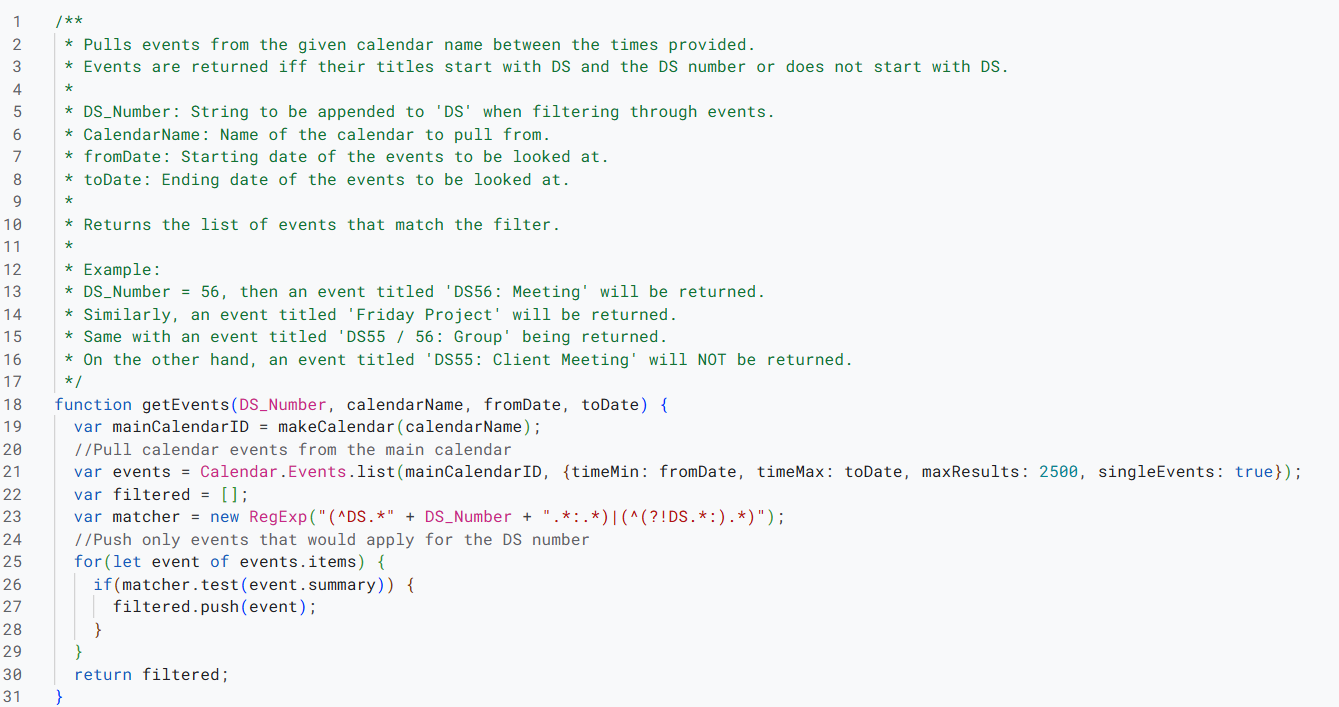
It did however lead to a complete rewrite of the original script to use the API's functionality rather than the more simplistic Calendar functions. And here is where another small issue had risen.
Event Names (aka the part with Regex)
With DS57 joining next week, it means that even more events are going to be on the calendar. And the one that caught my eye during testing was one titled 'DS55/56: Project Time'. From how the filter was original written, this wouldn't be added to the DS56 calendar. So something new needed to be made to deal with this issue.
More if statements and conditions could be added, but that only makes the code harder and harder to manage. So with the title being a string, I took a look at doing it through a Regex matcher. And after some tinkering (especially with the website https://regex101.com/), I came to my answer.
Regex, or Regular Expression, is a series of characters used to match other strings. It uses a set of characters to understand what to look for. It allows for a logic to follow, and even specific parts of the string to be pulled out. There are also global flags that can be included to help supplement the logic or provide more options within them. In this case, no flags are needed.

It looks a bit complicated, so let's break it down:
The parentheses in blue indicate groupings.
The straight line in orange tells the matcher that we want to allow either of the groupings.
The question mark in yellow at the start of the grouping following with the exclamation mark in purple means that we want to match so long as it doesn't match the expression within this grouping.
Periods in pink signal that we will allow an single character, with the asterisk (*) in green after says that we'll allow for any number of the previous element, here being the period.
The caret (^) in red tells the matcher that this is the start of the expression we want to start matching on.
The rest in black are standard characters that it wants to match on.
Overall, this means that it matches on the events that we want, replacing the black numbers with whatever number the cohort is.
Full Automation
The final step is going to be able to pull information from some source to know what the current Data School cohorts are needing the calendar, and knowing their start and end date, rather than hard-coding in all the information. At the moment, this is done manual in the function that is called by the trigger in Google, but is something that could be done in the future.
Beyond that would be to have it saved, stored, and deployed on a more permanent account, rather than my own. And after that, only easy maintenance is needed from there.