


Getting your head around date conversions can be a little tricky; I still do not fully understand all of the functions myself. However, we shall all become masters by the end of this blog!
First, we need to understand what discrete and continuous mean.
Discrete refers to separate, individual pieces. Think of these as "buckets" used to group your data. Because each bucket is its own entity, there is a finite range and no "in-between" values. For example, humans can only be counted in whole numbers, unless you want to count a baby as 0.5 of a person!
Continuous, on the other hand, means the values flow smoothly into each other without gaps. Instead of buckets, think of it as measuring along a continuous range. Temperature, for example, doesn't just jump from one degree to the next; it can be expressed with infinite precision (decimals), allowing you to see the tiny changes along the way.
Regarding the blue and green pills in Tableau:
- Blue dates are discrete. For example, if you select 'Month,' the pill turns blue because Tableau treats each month as a distinct bucket, aggregating all data for that month across the entire dataset into a single column. This creates a header in your view, making it ideal for bar charts where you want clear separation.
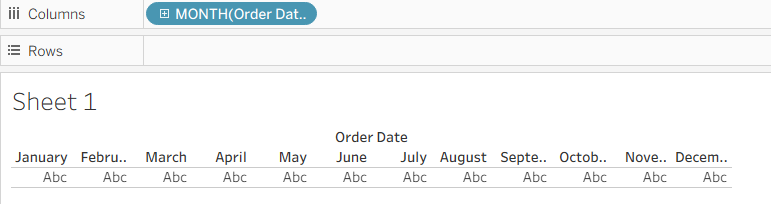
- Green dates are continuous. The pill turns green because Tableau is creating a chronological axis. It treats the date as a timeline where data flows smoothly from one specific point to the next (e.g., January 2023 all through to February 2023). This allows you to define how granular you want your axis to be; you can decide whether you want to see the trend by year, month, or even by the second. This is best represented by a line graph to show the "flow" of time.

Let us begin!
Calculations & Transformations
DATEADD: Adds a specific interval to a date.

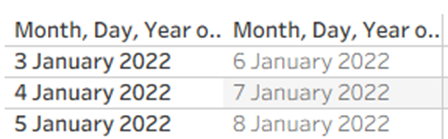
DATEDIFF: Calculates the difference between 2 dates. It subtracts the end date from the start date.


DATEPARSE: Converts a text (string) into a formal Date format. This function is great for messy data.

Extracting Parts of the Date
DATENAME: Returns a specific part of a date (day, month, or year) as a string.

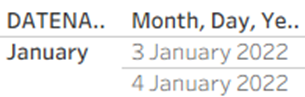
DATEPART: Returns a specific part of a date as an integer.

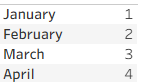
DATETRUNC: This "rounds" a date to the start of a specific unit.

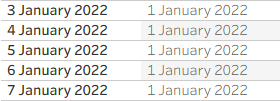
For this example, Tableau is rounding all the days of January to the 1st of January.
Simple Shorthand Functions
These are the quick versions of DATEPART.
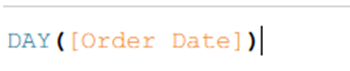
DAY:

WEEK:


MONTH:


QUARTER:


YEAR:


ISO (Standardised) Dates
These follow the strict ISO 8601 standard (YYYY-MM-DD). This is a useful function for international companies where "Week 1" must be defined consistently.
ISOWEEKDAY: Gives each day a number, from 1-7, in a week. Monday being day 1.


ISOWEEK: Returns the week starting from the first of January.


ISOQUARTER: Returns the ISO quarter of a date as an integer.


ISOYEAR: Returns the year as an integer for a given date.


Validating & Comparing dates
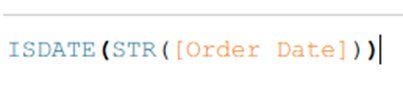
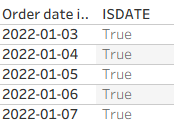
ISDATE: This checks if a string is a valid date. It returns true if so, and false if not.
MAX: Returns the most recent date in the data.
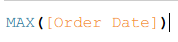
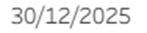
MIN: Returns the earliest date in the data.


"Right Now" Functions
NOW: Returns the current local date and time.


TODAY: Returns the current local date.


I hope this has made understanding date functions a little bit easier.
Happy date-ing!