


dbdiagram.io is a delightful, free tool for quickly creating database diagrams using a code-based approach. This style of visualization helps you avoid running out of space, over-relying on a mouse, or wrestling with formatting issues common in traditional diagramming tools.
While dbdiagram provides thorough documentation, the sample code alone is often enough to get started. The site uses DBML (Database Markup Language), which allows you to define tables, fields, and relationships in code and instantly visualize them in an interactive diagram. This can be quickly picked up by any user, regardless of coding background.
Creating Tables
dbdiagram provides sample code to help you create tables with ease. You can name a table, define its fields (attributes), specify a primary key (optionally), and even add notes to individual fields.
Within a table, you define fields by writing the field name followed by its data type. You can then add tags such as primary key, not null, or note.
Table follows {
  following_user_id integer
  followed_user_id integer
  created_at timestamp
}

Table users {
  id integer [primary key]
  username varchar
  role varchar
  created_at timestamp
}

Table posts {
  id integer [primary key]
  title varchar
  body text [note: 'Content of the post']
  user_id integer [not null]
  status varchar
  created_at timestamp
}
Creating Relationships
dbdiagram allows you to define relationships either directly in your code or by drawing connections between fields in the visual diagram. Any relationships you draw in the interface are automatically reflected back in your code.
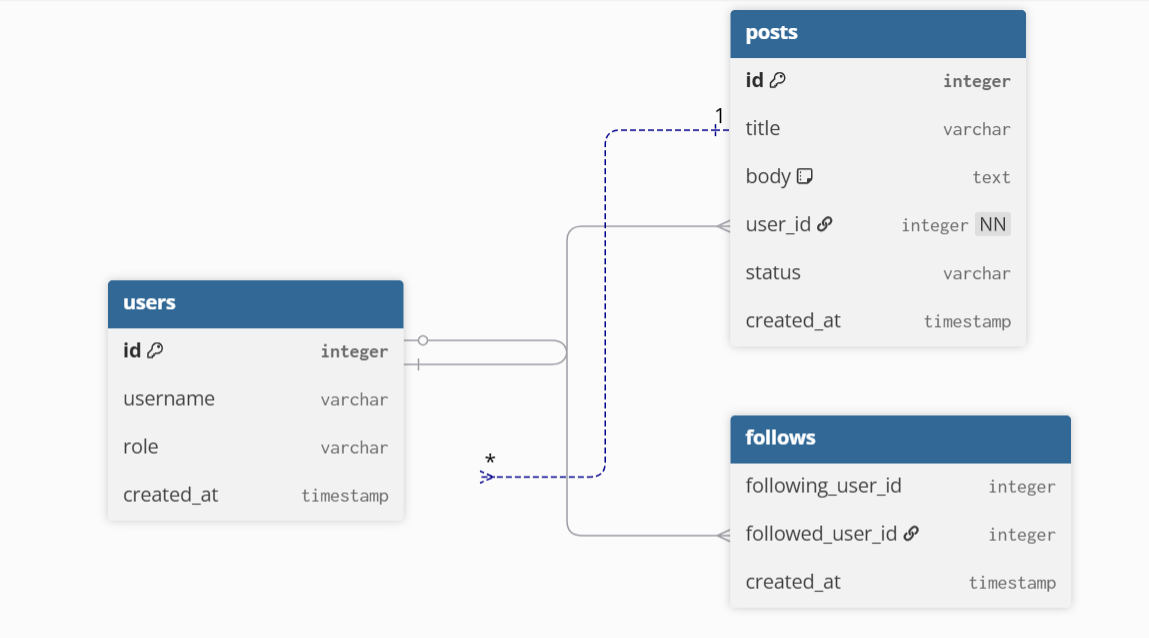
The default relationship type is one-to-many, which can be defined using < or > depending on the direction of the relationship.
Ref user_posts: posts.user_id > users.id // many-to-one
You can also define a one-to-one relationship using -.
I’ve loved using dbdiagram.io as a fast and intuitive way to plan database schemas that can be instantly saved as clean, professional-looking diagrams. It’s a fantastic tool for both quick prototypes and more thoughtful schema design.