


In the modern business landscape, data is arguably the most valuable asset a company possesses. However, having data and actually using it are two very different things. While tools like Excel have been the standard for decades, they have limitations when handling millions of rows of data.
Enter SQL (Structured Query Language).
SQL is the standard programming language used to manage and manipulate relational databases. It is the bridge between you and raw data. Whether you are an aspiring analyst, a consultant, or a seasoned engineer, mastering SQL allows you to interrogate the data directly, ensuring your insights are always built on the ground truth.
What is SQL?
SQL (pronounced "sequel" or "S-Q-L") is designed to interact with Relational Database Management Systems (RDBMS).
Think of a relational database as a massive collection of spreadsheets (called tables). Each table has a name, columns (headers describing the data), and rows (the actual records). SQL provides the commands to pull specific data out of these tables.
The Anatomy of a Basic Query
While SQL is a deep language, the vast majority of data analysis relies on just a handful of commands. A standard query is composed of three main clauses:
- SELECT: Specifies which columns you want to retrieve.
- FROM: Specifies which table the data lives in.
- WHERE: Filters the data to show only specific rows that meet a condition.
Here is a simple example. Imagine we have a table called employees.
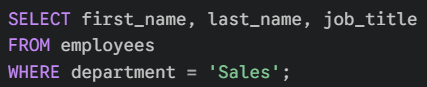
In plain English, this script tells the database: "Go to the employees table, find only the people who work in Sales, and show me their names and job titles."
However, retrieval is just the tip of the iceberg. The real power of SQL lies in its ability to summarise, transform, and connect data.
1. Summarising Data (GROUP BY)
Data analysis rarely looks at individual records; it usually looks at trends. To do this, we need to aggregate data - turning a million rows into a summary of ten rows.
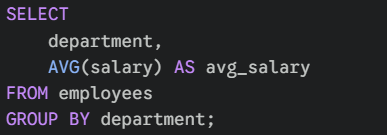
This is done using the GROUP BY clause. It allows you to organise rows that share common values into groups, often used with math functions like COUNT, SUM, or AVG.
For example, if you wanted to know the average salary per department:
2. Filtering Aggregations (HAVING)
This is one of the most common points of confusion for beginners: What is the difference between WHERE and HAVING?
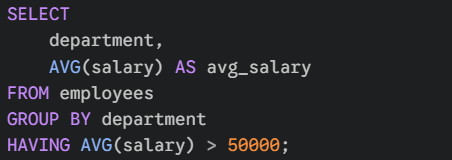
WHEREfilters raw rows before they are grouped.HAVINGfilters aggregated groups after they are grouped.
If you want to find departments with an average salary greater than 50,000, you cannot use WHERE, because the "average" hasn't been calculated yet when WHERE runs. You must use HAVING:
3. Transforming Data (CASE WHEN)
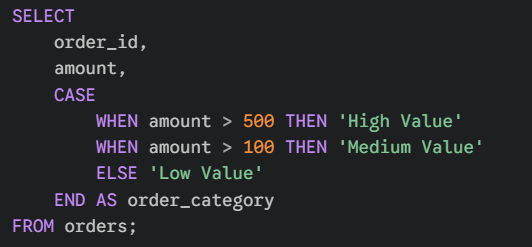
SQL isn't just for fetching data; it can also create new data on the fly. The CASE WHEN statement allows you to perform "If/Then" logic directly in your query to categorise or label your rows.
This is incredibly useful for grouping continuous data (like sales numbers) into categories (like "High" vs "Low") without changing the underlying database.
4. Controlling Output (LIMIT)
When working with massive databases, you rarely want to return all million rows to your screen. The LIMIT clause allows you to specify the maximum number of rows the query should return. It is essentially a "cut-off" point.

5. Connecting Data (JOINS)
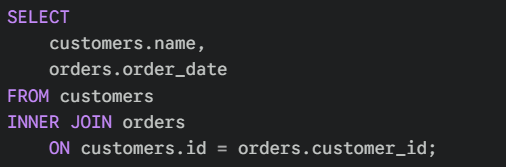
In a relational database, data is split into different tables to save space and maintain accuracy. Customer details might be in one table, while their orders are in another. To analyse them together, you use a JOIN.
A JOIN connects two tables horizontally based on a common "key" (usually an ID).
- INNER JOIN: Keeps only rows that match in both tables (e.g., Customers who have placed an order).
- LEFT JOIN: Keeps everything from the first (left) table, and adds matching details from the second (e.g., All Customers, even those with zero orders).
Putting It All Together: The Order of Operations
To master SQL, you must understand that the order in which you write the code is not the order in which the database executes it.
You write a query in this order: SELECT → FROM → WHERE → GROUP BY → HAVING → ORDER BY → LIMIT
But the database processes it in this logical flow:
- FROM / JOIN: The database first locates the tables and merges them.
- WHERE: It filters out the raw rows you don't need.
- GROUP BY: It organises the remaining rows into groups.
- HAVING: It filters out the groups you don't need.
- SELECT: It finally calculates and retrieves the specific columns you asked for.
- ORDER BY: It sorts the final result set. (Because this happens after
SELECT, you can sort by aliases you created in theSELECTclause!). - LIMIT: It cuts the result down to the requested size.
Understanding this order is the "lightbulb moment" for many analysts. It explains why you can't use a variable created in SELECT inside your WHERE clause - because strictly speaking, the SELECT hasn't happened yet!
Start with these core building blocks, and you will be able to handle 90% of the data questions thrown your way.
Conclusion
SQL is a logic-based skill. It requires you to understand exactly what you are asking for and how the data is related. By mastering aggregation, joins, and conditional logic, you unlock the ability to perform complex analysis directly at the source, saving you hours of manual work in spreadsheets.
Start simple, focus on the order of operations, and remember: the best way to learn SQL is to write SQL.
-- Tyler