


This blog is the second part of my previous blog, and therefore it will not include basic descriptions of what Tableau Server and Tableau Cloud are, but will instead go straight into the differences between them.
Licensing for Both
Overall Tableau Server and Cloud have role based licenses, which are the same as login based licenses. Login-based license management is when the user logs in to the server to access the cloud.
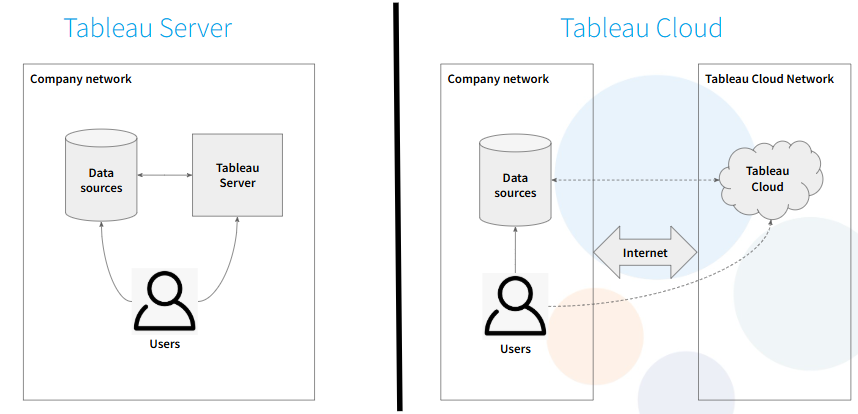
Tableau Server
Licensing
Tableau Server is core based, which means it is based on CPU, and it is slowly getting phased out. It is used for use cases where users are accessing the data externally, so when external users need to access data but are only viewers.
A 32 core license can work on a 16 core computer (or two 16 core computers), but not vice versa, as it would not activate.
Capacity
In Server there are no limits on capacity. It is only limited by the hardware, which means there can be as many users as wanted.
Sites and Identity
A site is the dropdown from when you open Tableau Server. In these there can be no transfer of data from the Data School site to the TIL site.
In Server there are an infinite number of sites, but these can't be distributed across regions. The identity store can be used with Active Directory domaining to centrally manage users and groups.
Server also uses Tableau user accounts, and it also supports SCIM for synchronising users and groups.
Monitoring
Server can be analysed in detail with the PostgreSQL repository.
Tableau Cloud
Licensing
There are two cloud based models. The first is based on analytical impressions (a view of a dashboard, or an export of a dashboard), meaning the more movement there is in your site, the more it costs.
The second is capacity based licensing, where you buy a block which gives you a prepaid capacity and usage that individuals can use. This is not as popular, as users must pay upfront for an amount of capacity.
Limits
Cloud is storage limited to 1TB. 25GB per site is a few million rows, which depending on the types of calculations and the amount of rows in the data there can be some limitations.
There is a 120 minute refresh limit, so if a refresh takes longer than 2 hours it will be stopped and there will be no update at all, it will simply fail. If it fails because of the size of the data source, then it must be altered so that it can run in under 120 minutes. Sometimes it is not because of the size of the data source but because of query errors, which delay the run.
There are also limits on how long it can take for a dashboard to load (5 minutes), and Cloud will log users out if they're idle for a couple of hours.
There is also a 40GB query memory usage limit, which applies if there are many calculations or many things which are taking up a lot of capacity.
Sites and Tableau Cloud Manager
TCM is Tableau Cloud Manager.
In Cloud, the standard package includes 3 sites, which can be located anywhere. Enterprise includes 10 sites and Tableau+ includes 50 sites, and these can also be located anywhere.
Authentication
Cloud supports a lot of authentication options.
Monitoring
In Cloud there is no access to the PostgreSQL repository, so it provides pre-built Admin Insights data sources provided by Tableau. The activity log in Cloud allows a more thorough analysis. It allows almost as much as the PostgreSQL repository, but not as thorough.
Tableau Bridge
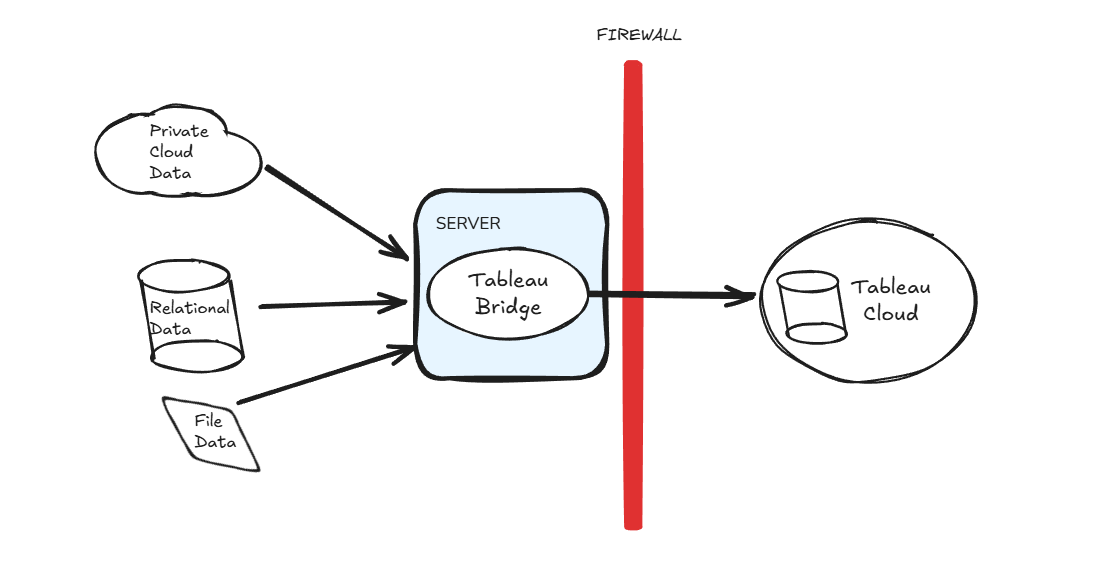
Tableau Bridge is access which is private. It has to be set up within a user environment and then it reaches out into Tableau Cloud. It is installed within a machine in a private network and it accesses data through a Bridge query accessing Tableau.
It has two application modes, application mode and service mode.
Service mode is in a server which enables continuous refreshing and live queries. Application mode is a legacy system which can be used on individual laptops to synchronise data regularly.
Application mode, shown below, has the limitation that as it is from a local disk, if the laptop is to be turned off then there are can be no refreshes to the data, limiting the user.
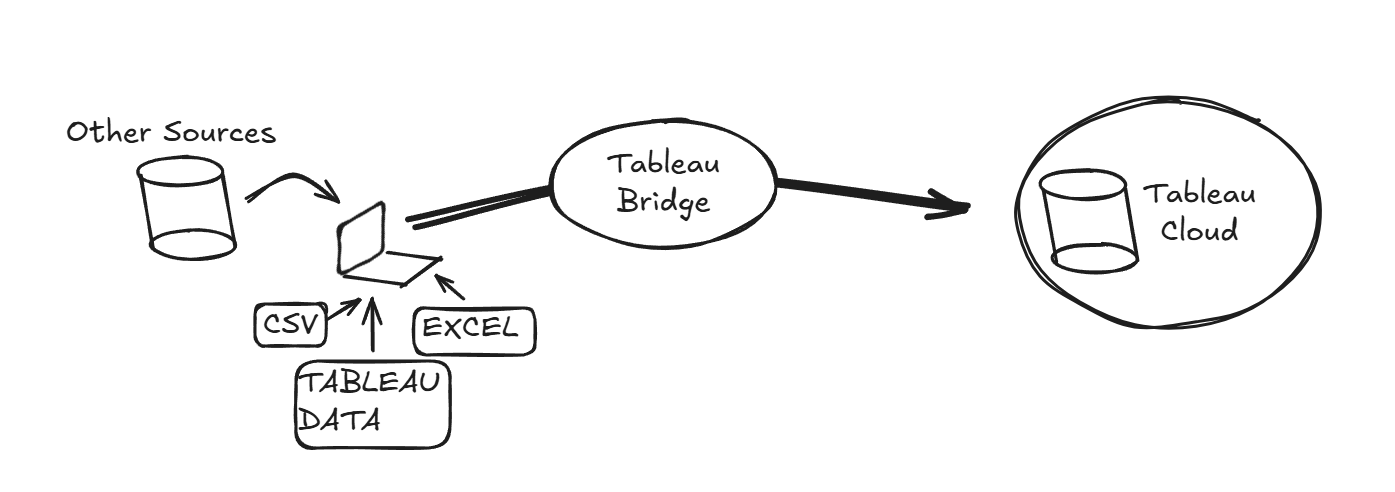
A limitation is that it cannot change between live and extract. When Tableau Cloud tries to access a data source in a database it will always try to reach for it, but it gets stopped by the firewall, it is a legacy mode for individual laptops to sync data irregularly. It is not a robust system to use as
For Bridge to work it is necessary to have C++ installed, along with a specific driver, which is MySQL, so that the data can be queried properly.